Get started

Everything you need to fill shifts and stay in sync

One app for tasks, shifts and messaging

Get started for free
Free forever for small teams No credit card, no trial expiration GDPR-compliant

Core features

Tasks and shifts

Team members browse available work and sign up for what matches their interest and schedule.

Self-signups choose to be there. No chasing. No no-shows.

Live messaging

Every task and shift gets its own chat channel. Message the whole team, a specific group, or an individual.

No more text messages "did you see my email?"

Reports and exports

Track task completion, hours worked, and participation over time.

Export hoursheets to billing or prove your impact.

See it in action

Tasks and shifts

Post work to the right people and let them come to you

Self-signup

Your default mode. Publish a task or shift, and team members claim it first come, first served. Or set a capacity and let multiple people sign up until the slots are full. No algorithms, no shift swapping.

Applicant queue

Need more control? Switch a task to approval mode. People apply, and you pick from the queue. This is useful for specialised work where you want to review before confirming.

Direct offers

For critical tasks, skip the broadcast entirely. Send a personal invitation to specific team members and track whether they accept or decline in real time.
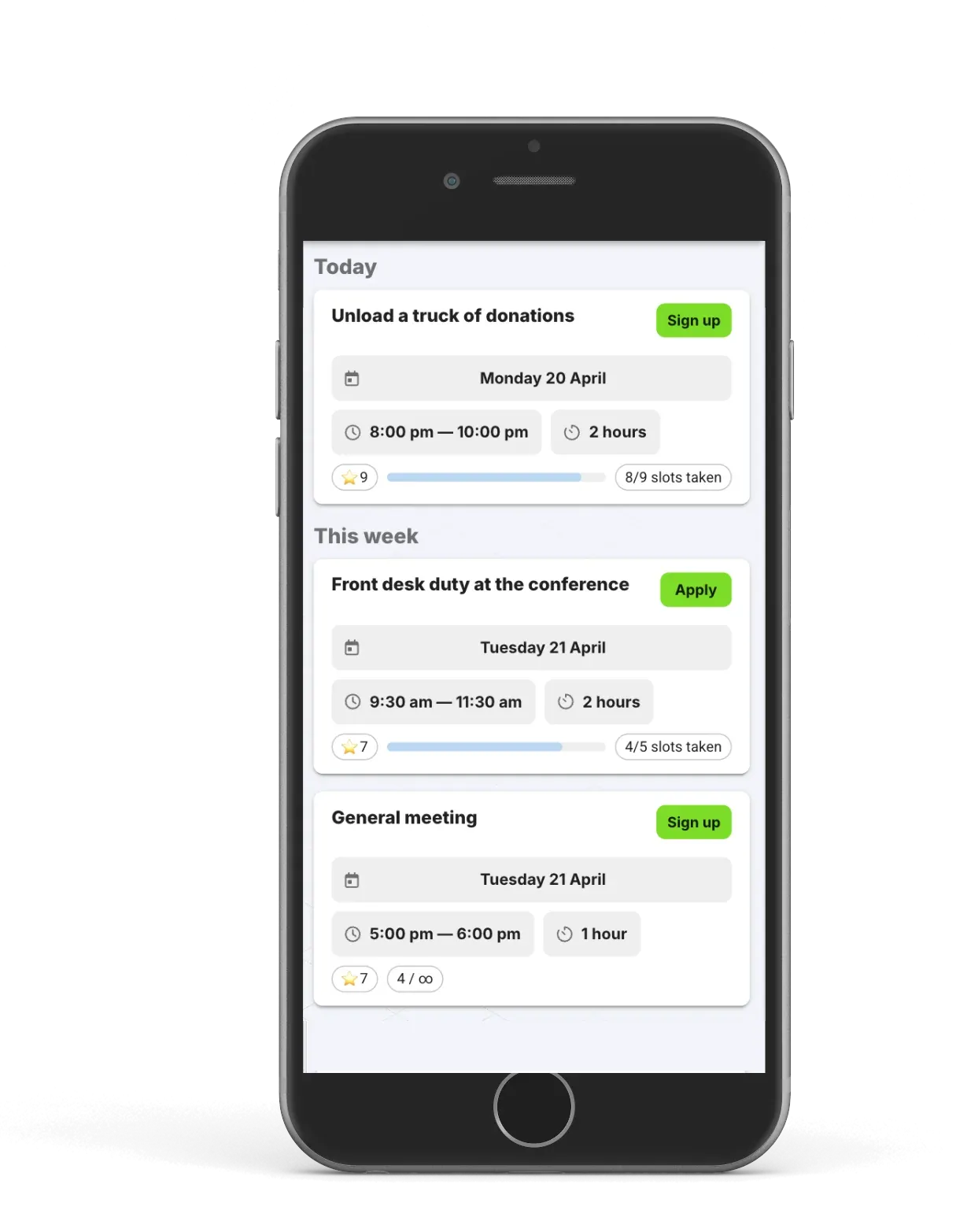
Zelos app interface showing task posting, signups, and built-in chat

Live messaging

Messages that stay where the work is

Task and shift channels

Every task and shift automatically gets its own chat space. Updates, questions, and coordination happen in context. Not in a sprawling group chat where last Tuesday's event and next Friday's shift blur together.

Direct and group messaging

Reach individuals or groups instantly. Push notifications land on their phone whether they're using the app or a browser. No one needs to "check the platform". The platform comes to them.
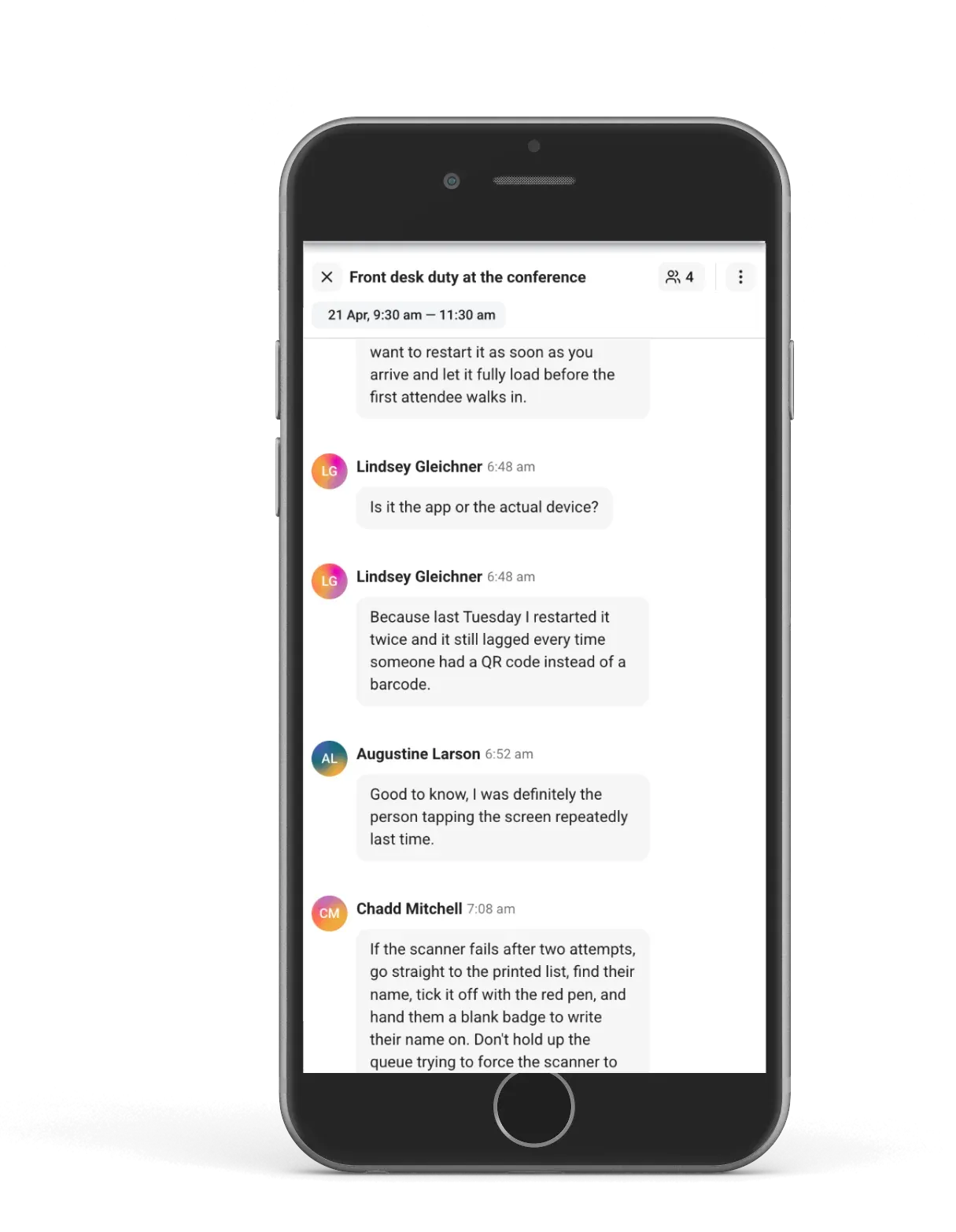
Zelos live messaging screen

Member profiles

Know your team. Reach the right people.

Profiles with custom fields

Every team member has a profile that stores skills, preferences, certifications, availability, and any custom fields you define. When a new task comes in, you already know who's qualified.

Groups and segments

Organise members into groups by role, location, project, or whatever makes sense for your team. Target tasks and messages to specific groups instead of broadcasting to everyone.

Self-service onboarding

New members join through your personal invite link. They fill in their own profile, set their language and time zone, and start seeing relevant tasks immediately after they're accepted to the team. No admin data entry required.
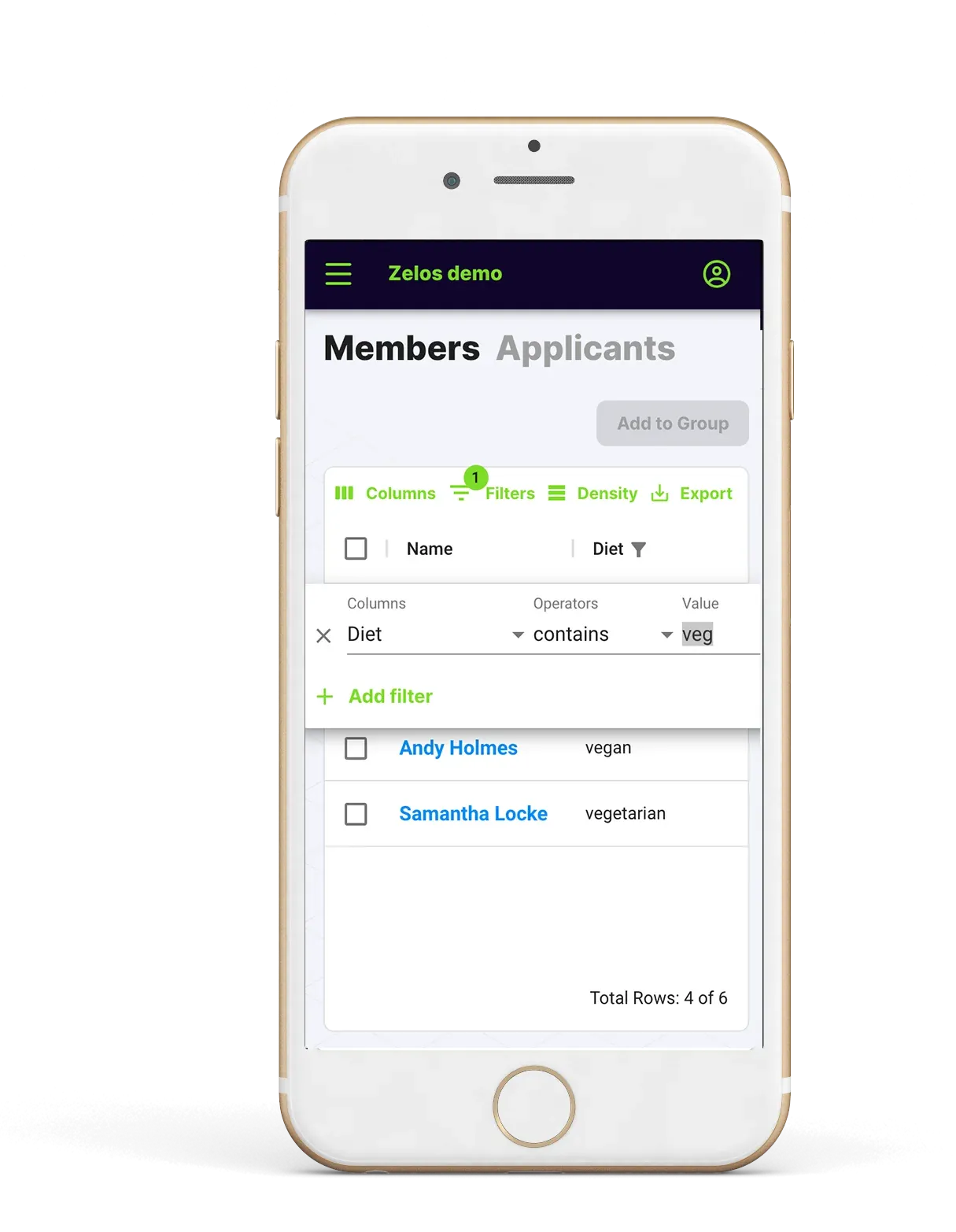
Zelos member segmentation screen

Privacy and trust

Private by default, not by admin effort

GDPR-compliant from day one

Zelos is built in Estonia, in the EU. Therefore it is fully compliant with the General Data Protection Regulation. No extra configuration, no compliance add-on, no enterprise-only toggle.

Invite-only workspaces

By default, your team is private. Only people with your invite link can request access, and you can approve every member before they see anything. Only the team owner can change the setting to auto-accept every applicant.

Data separation between members

Team members cannot see each other's contact details, schedules, or personal information. Admins get the full picture. Everyone else sees only what they need to do their work.

Supervised by design

All conversations on Zelos include admin oversight. There is no unsupervised 1:1 messaging between team members. This is a deliberate choice: it makes Zelos safer for programmes involving young people, vulnerable adults, or any context where accountability matters.

Reporting and data

Track the work. Export the proof.

Completion tracking

See which tasks and shifts were completed, by whom, and when. Monitor participation across your team to spot your most active contributors and identify people who might need a check-in.

Hour summaries

Generate hour reports with detailed timestamps. Filter by date range, member, or task type. Useful for payroll processing, grant reporting, volunteer hour verification, and contractor billing.

CSV exports on every plan

Download your task list and full member directory as CSV on any plan. Need to import work in bulk? Paid plans support CSV upload for creating large batches of tasks at once.

Open API and webhooks

The Enterprise plan includes full API access and webhook support for building custom integrations, syncing with internal systems, or automating workflows. Connect Zelos to whatever your team already uses.

Platform and access

Runs wherever your team is

Any device

Native iOS and Android apps, plus a fully responsive web version that works in any browser. Team members choose what suits them, the experience is consistent everywhere.

Any language*

Each team member sets their own interface language, time zone, and date format independently. Your team members in Spain and Australia both see Zelos in their own terms. *If your language is not on our list, let our support know. We continuously add new languages.

Any scale

The system handles ten people or ten thousand without slowing down. Infrastructure scales automatically. You never have to think about server capacity, upgrade tiers, or performance limits.

All of this starts free

  • Unlimited team members
  • Built-in messaging and CSV exports
  • No credit card, no trial expiration

When you need bulk uploads, higher task volume, or automated features, simply subscribe to a paid plan in the self-service.
Zelos illustration

Frequently asked questions

Everything you need to know about Zelos.

General

What is Zelos?
Zelos is a team management app where administrators post tasks and shifts, and team members sign up for the work that fits their skills and schedule. It includes built-in messaging, member profiles, and reporting — designed for volunteer groups, on-demand teams, and community organisations.
Who is Zelos for?
Zelos is built for anyone who coordinates groups of people around tasks or shifts — without needing enterprise-grade scheduling software. Common users include volunteer coordinators at nonprofits, on-demand staffing managers, community group leaders, event organisers, grassroots campaign coordinators, and field service dispatchers. It works equally well for a 15-person church group and a 5,000-person disaster relief operation.
How is Zelos different from other volunteer management or scheduling tools?
Zelos differs in three key ways. First, people choose their own work — there are no algorithms auto-assigning shifts or tasks. Second, pricing is never per-seat — your entire team joins for free regardless of size. Third, messaging is built in rather than requiring a separate app like WhatsApp or Slack. Most scheduling tools optimise for control; Zelos optimises for participation.
Is Zelos a scheduling app?
Not in the traditional sense. Scheduling apps typically let managers build a calendar and assign people to time slots. Zelos works differently: you post available shifts and tasks, and your team members browse and claim what works for them. Think of it as a signup board with built-in chat, rather than a top-down scheduler.
Is Zelos available in my country?
Yes. Zelos is available worldwide with no geographic restrictions. Each team member can independently set their own interface language, time zone, and date format. The platform is built and hosted in the EU.

Pricing and plans

Is Zelos free?
Yes. Zelos has a free plan with unlimited team members, task and shift posting, built-in messaging, and CSV data exports. There is no trial period and no credit card required. Paid plans are available when you need higher task volume, bulk CSV upload, or API access.
How much does Zelos cost?
Zelos is free to start with unlimited team members. Paid plans unlock additional features like higher task volume, bulk task creation via CSV, and advanced analytics. Enterprise plans include API access and webhook support. See the pricing page at getzelos.com/pricing for current plan details.
Does Zelos charge per user?
Our pricing is for the whole team. Zelos never charges per user. Whether your team has 10 members or 10,000, the member count does not affect your price. Paid plans are based on feature access and task volume, not headcount.
Do I need a credit card to sign up?
No. You can create an account and start using Zelos immediately without providing any payment information. The free plan has no expiration date.

Features

How does task signup work in Zelos?
Administrators create tasks with a title, description, time slot, and capacity (how many people are needed). Tasks are published to the team, and members browse available work and claim what fits. You can let anyone sign up freely (first come, first served), or switch to approval mode where members apply and you choose from the queue.
Can I target tasks to specific team members?
Yes. Zelos lets you tag members by skill, location, language, certification, or any custom attribute you define. When you publish a task, you can target it to a specific group so only qualified members see it. You can also send direct offers to specific individuals for critical tasks.
Does Zelos have a messaging or chat feature?
Yes. Zelos includes built-in messaging with push notifications. Every task and shift automatically gets its own chat channel for contextual updates and coordination. You can also message individuals or groups directly. All conversations include admin oversight — there is no unsupervised 1:1 messaging between team members.
Can I track hours and generate reports?
Yes. Zelos tracks task completion with detailed timestamps. You can generate hour summaries filtered by date range, member, or task type, and export the data as CSV for payroll processing, grant reporting, volunteer hour verification, or contractor billing.
Can I export data from Zelos?
Yes. All plans — including the free tier — support CSV export of your task list and full member directory. Pro plans also support bulk task creation via CSV upload, allowing you to post hundreds of shifts from a single file.
Does Zelos have an API?
Yes. Enterprise plans include full REST API access and webhook support for building custom integrations, syncing with internal systems, or automating workflows.
Does Zelos integrate with Zapier or other automation tools?
Zelos does not currently offer a Zapier integration. For custom automation and integrations, Enterprise plans provide API access and webhooks that can connect Zelos to your existing systems.
Can team members use Zelos without downloading an app?
Yes. Zelos works in any web browser on desktop or mobile. Native iOS and Android apps are also available for team members who prefer a dedicated app experience, but the browser version is fully functional.
Does Zelos support multiple languages?
Yes. Zelos supports multiple interface languages, and each team member can set their own preferred language independently. This means an administrator in Estonia and a volunteer in Australia can both use Zelos in their own language within the same team.

Privacy and security

Is Zelos GDPR-compliant?
Yes. Zelos is built in Estonia, in the European Union, and is fully GDPR-compliant by default. There is no additional configuration or enterprise-only compliance add-on required.
Can team members see each other's personal information?
No. Team members on Zelos cannot see each other's contact details, schedules, or personal information. Only administrators have access to the full member directory. Team members see only the tasks available to them and the chat channels they participate in.
Is my team workspace private?
Yes. Every Zelos workspace is invite-only. Only people with your personal invite link can request access, and an administrator must approve each member before they can see any content. There is no public directory of Zelos teams.
Are chats on Zelos private between members?
All chats on Zelos require admin oversight. The platform does not allow unsupervised 1:1 direct messaging between team members. This is a deliberate design choice to ensure accountability and safety, making Zelos suitable for volunteer programmes involving young people or vulnerable adults.

Getting started

How long does it take to set up Zelos?
Most teams are up and running in under five minutes. You create an account, name your team, post your first task, and share your invite link. There is no onboarding call, no demo required, and no configuration to complete before you can start.
How do I invite team members to Zelos?
When you create a team, you receive a personal invite link. Share this link via group chat, email, social media, or even print it on a flyer. People who follow the link can request to join, and you approve them from your admin dashboard.
Do my team members need training to use Zelos?
No. Zelos is designed to be self-explanatory for team members. They follow an invite link, set up a profile, and start browsing available tasks. The interface is deliberately simple — most members are active within minutes of joining.
Can I run multiple teams on one Zelos account?
Yes. A single Zelos account can manage multiple independent teams, each with its own member list, tasks, and chat channels.

Comparisons

Zelos vs SignUpGenius — what's the difference?
SignUpGenius is primarily a web-based signup sheet — people sign up for time slots on a form. Zelos is a full team management app with member profiles, built-in messaging, task targeting, and participation tracking. Zelos also includes native mobile apps and does not show ads to your team.
Zelos vs When2Work or other shift scheduling software — what's the difference?
Traditional shift scheduling tools let managers build schedules and assign people to slots. Zelos inverts this model: you post the available work and let people claim it. This self-signup approach leads to higher attendance rates and lower administrative overhead, because people choose work that genuinely fits their availability.
Zelos vs WhatsApp or Facebook groups for team coordination — what's the difference?
Group chats on WhatsApp or Facebook are easy to start but become chaotic as teams grow. There's no way to assign tasks, track completion, manage capacity, or keep conversations attached to specific work. Zelos provides structured task posting, self-signup, contextual chat channels per task, member profiles, and data exports — while keeping the simplicity of a messaging-first experience.
Can Zelos replace spreadsheets for volunteer management?
Yes. Many volunteer coordinators switch to Zelos from shared Google Sheets or Excel files used to track availability and signups. Zelos replaces the spreadsheet with a live signup board, eliminates manual data entry, and adds built-in messaging and reporting that spreadsheets cannot provide.

Technical

What devices and platforms does Zelos support?
Zelos is available as a native app on iOS (App Store) and Android (Google Play), and as a responsive web application that works in any modern browser on desktop, tablet, or mobile. All platforms share the same features and data.
Where is Zelos data stored?
Zelos is built and operated from Estonia, in the European Union. Data is hosted on cloud infrastructure within the EU, in compliance with GDPR requirements.
Does Zelos work offline?
Zelos requires an internet connection to sync tasks, messages, and signups. However, the mobile apps are designed to handle intermittent connectivity gracefully — actions are queued and synced when a connection is restored.
What happens to my data if I cancel my paid plan?
If you downgrade from a paid plan to the free tier, your team data, member profiles, and task history are preserved. You retain access to all core features on the free plan, including CSV exports of your data.